
Our Work — Before & After Gallery
Actions speak louder than words. Browse real photos from actual restoration projects completed by the True Day Water Damage Restoration team throughout South Jordan and Salt Lake County, Utah. From burst pipes and flooded basements to mold-covered walls and fire-damaged rooms, you will see firsthand the quality and thoroughness we bring to every job. Every project is different, but our commitment is always the same: restore your property completely, safely, and as quickly as possible. Have damage right now? Do not wait — call us at (385) 247-9359 for an immediate response.Water Damage Restoration
Water damage can happen in an instant — a burst pipe, an overflowing appliance, or a sudden storm. Our team responds fast, extracts standing water, and dries your structure completely using industrial equipment. These photos show the before-and-after results of our water extraction, structural drying, and full restoration work.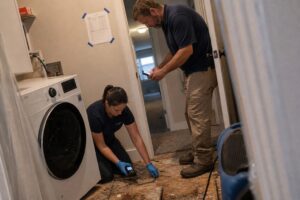
Basement Flooding
Flooded basements are one of the most common calls we receive throughout Salt Lake County — especially after heavy rain or spring snowmelt. Our team removes every drop of standing water, thoroughly dries the structure, and restores your basement to a safe, clean condition.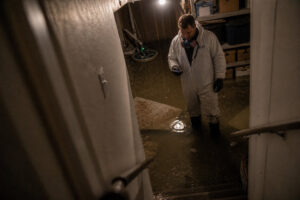
Mold Remediation
Mold can develop within 24 to 48 hours of water exposure and spread quickly if not addressed. Our certified remediation team contains, removes, and treats mold at the source — safely and thoroughly. These photos show the dramatic results of our mold remediation work throughout Salt Lake County.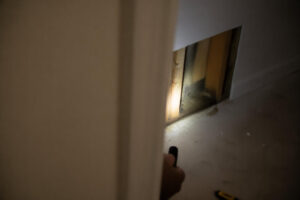
Sewage Cleanup
Sewage backup is one of the most hazardous property emergencies a homeowner can face. Our team handles Category 3 black water situations with the proper protective equipment, disinfection protocols, and disposal procedures required to make your property safe again.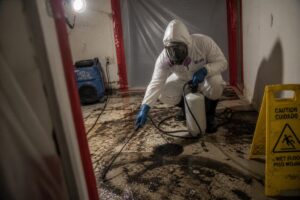
Fire & Smoke Damage Restoration
Fire damage leaves behind soot, smoke residue, and odors that penetrate deeply into walls, ceilings, and contents. Our fire restoration team handles everything from emergency board-up and tarping through full structural restoration and contents cleaning.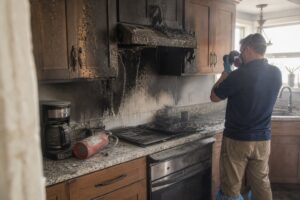
Structural Drying & Dehumidification
Visible water removal is only the beginning. Hidden moisture trapped inside walls, under floors, and within structural framing must be completely eliminated to prevent mold growth and long-term structural damage. These photos show our professional drying equipment setup and the results of thorough structural drying.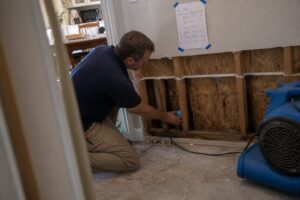
Flooring Removal & Replacement
Water-damaged flooring must often be removed completely to allow the subfloor to dry and to prevent mold growth underneath. Our team handles flooring removal and full replacement — hardwood, laminate, tile, carpet, and vinyl.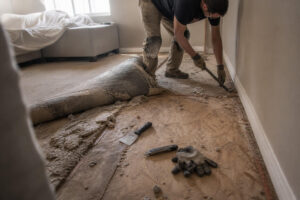
Drywall Repair & Reconstruction
Water damage often necessitates either partial or complete replacement of drywall. Our crew handles everything from cutting out and replacing damaged sections to full room reconstruction — matching existing textures and finishes so the repair is seamless.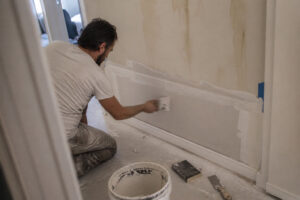
Storm Damage
Severe weather events in Salt Lake County can cause significant water intrusion through roofs, windows, and foundations. Our storm damage restoration team responds quickly to minimize further damage and restore your property.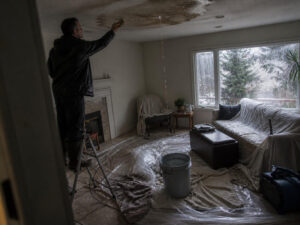
See the True Day Difference for Yourself
Every photo in this gallery represents a real family or business owner in South Jordan or Salt Lake County who trusted us with their property during one of the most stressful moments of their lives. We take that trust seriously — and these results are our proof. Whether you are dealing with a minor leak or a major disaster, True Day Water Damage Restoration is ready to help. Call us now at (385) 247-9359 for a free estimate and fast response.About these photos
Every photo on this page is from an actual True Day job in South Jordan or an adjacent city. We don’t use stock photography of other companies’ work or AI-generated images presented as real jobs.
What we photograph on every job
- Arrival state: wide and close-up photos of standing water, visible damage, affected contents — before any work begins
- Moisture map: FLIR thermal images showing water migration behind walls and under floors
- Drying setup: equipment placement, air-mover count, dehumidifier placement
- Daily readings: GE Protimeter moisture-content numbers on affected framing + the dry baseline from unaffected rooms
- Dry verification: final readings matching baseline, before reconstruction starts
- Reconstruction progress at each phase (demo, framing repairs if needed, drywall, flooring, paint)
- Final state: finished room, close-outs for carrier documentation
Why we document this much
Three reasons. First, it’s how insurance claims get approved and supplements get paid — adjusters see what we saw. Second, it protects you if a dispute arises later about scope or condition. Third, it’s how we hold our own crew accountable — readings on paper force honest work.
Privacy and consent
Photos published here are shared with homeowner permission. Faces, addresses, and anything identifying are either excluded or blurred. The full job file (including anything not shown) stays in our 7-year retention and is available to you anytime on request.
Reading the photos — what to notice
A restoration photo tells more if you know what to look for. Here’s how to read these.
Arrival photos
- Water line. Where the water stopped indicates both the volume of the loss and the direction of migration.
- Visible contents. What’s on the floor before we move anything indicates the triage sequence.
- Lighting conditions. Harsh daylight hides water that reflection shots catch; most arrival photos use flash + ambient to balance.
Moisture-map photos
- FLIR thermal images show temperature boundaries. Blue zones are cooler (likely wet); orange zones are warmer (likely dry). The sharpness of the boundary tells us how fresh the migration is.
- Protimeter readings on paperwork show actual moisture content percentage. Numbers like 15-20% on affected material + 7-9% on dry baseline = active drying required.
- GPS + timestamp are standard. Verify by hovering on metadata.
Equipment staging photos
- Air mover count + placement reveals the air-exchange plan. More air movers in a wet zone = faster drying.
- Dehu location relative to air movers reveals the exchange loop logic.
- HEPA negative-air presence indicates Cat 2 or Cat 3 scope or mold conditions.
What’s NOT visible in restoration photos
- Moisture inside wall cavities — FLIR shows the boundary from outside, but what’s behind requires pin-meter or cavity sampling.
- Air quality during cleanup — HEPA is active, you don’t see the filtration.
- Water category. A photo of standing water looks the same whether it’s Cat 1 or Cat 3; category is a lab-criteria call.
- Specific moisture-reading numbers — usually written on paperwork, not photographed directly.
What to ask a contractor who shares photos
What was the water category? What were the Protimeter readings at the time of these photos? Where did the water migrate to that isn’t visible here? What’s the dry-standard target for this material?
How to actually read a restoration photo (so you can tell real from staged)
Restoration-company websites are full of before/after photos, but not all of them show what they claim to show. Here’s how to read a restoration photo accurately — both ours and anyone else’s — so you can tell what the job actually involved.
- Natural daylight shows true colors and real water staining
- Flashlit photos can hide staining because the flash washes out shadow detail
- Harsh overhead light casts shadows that can look like damage — or hide it
- Our photos use natural light where possible; when flash is needed (basements, closets), we take a second non-flash reference
- A photo without scale (ruler, hand, standard-size object) can make a tiny stain look big or hide the real extent of damage
- We include a 6-inch ruler in close-ups of specific damage and a reference object (keys, phone) in context shots
- Watch for photos that are tight-cropped on dramatic details — sometimes that’s the whole story and sometimes it’s hiding a small scope made to look big
- Photo metadata (EXIF) carries a timestamp if the camera is set correctly — useful for insurance disputes about when damage was documented
- Our smartphones and tablets have correct time; our photos’ metadata is reliable
- Timestamps on a company’s website images are not usually visible to visitors, but they matter in the file we send to the adjuster
- Same camera angle for before and after? Or different angles that make the comparison misleading?
- Same lighting conditions in both? Different lighting dramatically changes how materials look
- Same lens and distance? Wide-angle on “before” and tight on “after” is an old trick to exaggerate the difference
- Our before/after pairs use the same angle, lighting condition, and distance where possible — so what you see is a real comparison
What a thorough photo set should include
- Wide shot of the affected area for context (what room, what side)
- Mid shot of the specific damage with scale reference
- Close-up of material condition (water line, mold growth, char pattern)
- Moisture-meter reading photo (meter + location) showing the actual number
- Equipment-placement photo showing how the drying was set up
- Daily moisture-check photos showing the readings coming down over the job
- Final condition photo matching the wide-shot angle for the before
If a company’s gallery doesn’t show meters, moisture logs, or equipment placement — just dramatic before/afters — it’s showing you marketing, not documentation.
Why we show 3 photos per job, not 2
Standard restoration marketing uses before-and-after pairs. Those are useful for showing cosmetic transformation, but they skip the middle part — which is where the actual work happened. We publish three-photo sets whenever possible. Here’s why:
| Photo | What it shows | Why it matters |
|---|---|---|
| Before | Original condition — the damage, water line, mold, soot, water intrusion | Establishes the scope and the baseline; what we started with |
| During | Mid-job: demo complete, equipment staged, containment up, drying active | Shows the actual work and methodology; proves there was a real scope between before and after |
| After | Restored condition — dry, clean, rebuilt, finished | The result the homeowner lives with |
What the during-photo makes visible
- Containment setup (poly, negative air) — shows Cat 3 or sensitive scope was handled per standard
- Flood-cut heights — shows we removed only what was needed, not everything
- Equipment placement — shows the drying was engineered, not just “we set up some fans”
- Materials bagged and labeled — shows disposal was handled correctly
- Framing exposed and clean — shows the substrate was addressed, not covered up
Why some restoration companies don’t show the middle
- The middle isn’t photogenic — messy and industrial-looking, not showroom
- If the work wasn’t properly done, the middle shows it — so some companies prefer to skip it
- “Before and after” implies magic; three photos imply methodology, and methodology is harder to fake
How to use these photos
- Compare the before and during — does the demo scope match what the before suggests was wet?
- Compare the during and after — does the rebuild match the pre-loss condition in the before?
- Check for consistency in angle and lighting across the three — a company that stages the after-photo differently is hiding something
When we don’t have all three
- Overnight emergency work — sometimes the before gets taken on arrival but the during gets skipped because the team is moving fast; we try to catch at least a mid-work shot before close-out
- Customer privacy request — some homeowners decline publication of specific photos; we honor that and don’t publish partial sets as if they’re complete
- Pre-existing condition conflicts — if the before shows something we didn’t fix (because it wasn’t our scope), we annotate that in the published set
If any three-photo set in our gallery doesn’t make sense — the middle doesn’t match the before, the after doesn’t match the middle — ask us about that specific job. We’ll explain.
How to use the gallery to find jobs like yours
If you’re trying to understand what your specific water-damage job will look like, finding comparable sets in the gallery can help calibrate expectations. Here’s a guide to what each service’s gallery entries typically show:
| Service type | What to look for in the gallery |
|---|---|
| Water damage mitigation (Cat 1) | Standing water + extraction scene; air mover + dehumidifier setup; moisture-meter readings; demo that was limited (flood cut not full-wall removal) |
| Water damage mitigation (Cat 3) | Full containment poly setup; crew in Tyvek PPE; aggressive material removal (carpet, drywall, insulation); negative-air scrubber visible; manifest-bagged biohazard waste |
| Mold remediation | Containment zone with HEPA negative air; crew in Tyvek + respirators; visible mold on removed drywall; post-cleaning view of same area |
| Fire damage | Char and soot patterns; interior fire sequence; smoke residue on walls; cleaning progress; final restoration |
| Sewage cleanup | Similar Cat 3 containment imagery; emphasis on antimicrobial application + decontamination |
| Storm damage | Exterior damage source documentation + interior mitigation; often tarp or board-up on exterior |
| Commercial | Larger scale; equipment staging; often after-hours operation evident |
What the before/during/after structure tells you
- Before: baseline damage; how your specific situation might compare
- During: methodology; equipment placement; containment setup — this is where the real work differs between companies
- After: restoration quality; attention to detail
Specific things to look for in any gallery
- Moisture-meter in close-up photos showing numbers — separates documentation discipline from marketing-only galleries
- Equipment placement — air movers angled, dehumidifier central — not just randomly in frame
- Containment poly — properly sealed, not just loose plastic
- Crew PPE matching the scope type — Cat 3 jobs need visible Tyvek, respirators
- Scale references — the same before/during/after angle lets you compare
What the gallery doesn’t show (and why)
- Homeowner faces — we blur or omit for privacy
- Interior views that would identify the specific home when customer declined publication
- Specific documents (insurance, invoices) — redacted or not shown
- Scope changes mid-job — the published set is the finished scope
When your job won’t look like anything in the gallery
- Every job has unique details — use the gallery to understand scope categories, not to predict exact outcomes
- Rare scenarios (specific commercial setups, large-loss situations) may not appear until we have customer permission
- Ask your lead tech for photos from a similar job if you want visual reference during your scope planning
If you want permission to not be in the gallery
- Standard default: we don’t publish without explicit written customer permission
- Opt-out at any time — we remove photos from the gallery on request
- Documentation of your job remains in our files for warranty + records; just not published
What our crews photograph on every job
The gallery shows finished results. The documentation behind each job is heavier than what gets published. Here is what gets captured during a standard mitigation, before, during, and after:
The homeowner receives the full documentation set at job close. Published gallery photos are a small sample of what gets filed on each job.
Privacy standards behind the published gallery
Published photos look like easy marketing — but the pipeline from job-site to gallery has specific privacy rules. Here is how we handle homeowner data and photos:
The published gallery is a sample curated for teaching value and privacy. If you’re hesitating to let us document your job because you’re worried about photos circulating, the standards above apply by default — not as a special favor.